IGNOU Online Assignment Submission 2026: Indira Gandhi National Open University (IGNOU) has introduced an Online Assignment Management System (OAMS) to make assignment submission easier for students enrolled in its Open and Distance Learning (ODL) and online programmes. Through this facility, eligible learners can upload their handwritten assignments online using their IGNOU Samarth student accounts.
The IGNOU Online Assignment Submission 2026 facility is particularly useful for students preparing for the December 2026 Term-End Examination (TEE). Instead of visiting a study centre to submit assignments, eligible students can use the online system to upload their course-wise assignment PDFs and receive submission acknowledgements.
IGNOU has announced 20 November 2026 as the online assignment submission deadline for the December 2026 TEE. Students should complete the process before the deadline and carefully follow the university’s file-format and submission instructions.
In this article, you will learn how to submit IGNOU assignments online, how to prepare PDF files, what information to include on the first page, how to check submission status and what to do if you face technical problems.
IGNOU Online Assignment Submission 2026: Overview
Here are the important details about the online assignment submission facility.
| Particulars | Details |
|---|---|
| University | Indira Gandhi National Open University |
| Common Name | IGNOU |
| Assignment Submission System | Online Assignment Management System (OAMS) |
| Examination Session | December 2026 TEE |
| Submission Mode | Online |
| Eligible Learners | Eligible ODL and Online programme students |
| Submission Portal | IGNOU Samarth Student Portal |
| Last Date | 20 November 2026 |
| Assignment Format | Handwritten and scanned PDF |
| Maximum File Size | 20 MB per PDF, as reported for the OAMS instructions |
| Course-Wise Upload | Separate PDF for each course |
| Acknowledgement | Available after successful submission |
| Official Website | https://www.ignou.ac.in/ |
| Student Login | https://ignou.samarth.edu.in/index.php/site/login |
Important: The deadline and technical requirements should be checked against the latest IGNOU notification. Students should follow any subsequent instructions or extensions issued by the university.
What Is IGNOU Online Assignment Management System (OAMS)?
The Online Assignment Management System, commonly called OAMS, is a facility introduced by IGNOU for online submission of assignments.
Under this system, eligible students can log in to their IGNOU Samarth accounts, access the assignment submission facility and upload their completed course-wise assignments.
The system is intended to make assignment submission more convenient and provide an online record of the submission process. Students can also receive an acknowledgement and check assignment evaluation information through the available student services.
The online system is relevant for students enrolled in various ODL and online programmes, including eligible undergraduate, postgraduate, diploma and certificate courses.
Some important features include:
- Online assignment upload through the student account.
- Course-wise assignment submission.
- Upload of scanned handwritten assignment answers.
- Online submission acknowledgement.
- Access to assignment evaluation status.
- Reduced need for physical visits when online submission is applicable.
Students should remember that OAMS does not mean assignments can be submitted in any format. They must follow the university’s instructions regarding handwriting, scanning, PDF creation, file size and course selection.
IGNOU Online Assignment Submission Last Date 2026
The announced last date for online assignment submission for the December 2026 Term-End Examination is 20 November 2026.
Students who have not yet submitted their eligible assignments should complete the process before the deadline. Waiting until the final day can create problems if the portal is slow, the internet connection fails or a PDF does not meet the upload requirements.
The following table summarises the important date information.
| Event | Date |
|---|---|
| OAMS Announcement | October 2026 |
| December 2026 TEE Assignment Submission | Online |
| Announced Last Date | 20 November 2026 |
| Examination Session | December 2026 TEE |
The university’s announcement page should be checked regularly for any revised instructions.
Students who have already submitted and passed an assignment for a particular course do not need to submit it again. Similarly, students who have already submitted the relevant assignment in hard copy to their study centre or regional centre for the December 2026 TEE should follow IGNOU’s instructions rather than uploading another copy unnecessarily.
How to Submit IGNOU Assignments Online 2026?
Students can submit their assignments through the IGNOU Samarth student portal by following the steps below.
Step 1: Visit the IGNOU Student Login Portal
Open the official student login page:
https://ignou.samarth.edu.in/index.php/site/login
This is the portal where students can access their accounts and available student services.
Step 2: Log In to Your Account
Enter your registered login details, such as your username and password.
If you have not registered on the student portal, follow the registration instructions displayed on the website.
Step 3: Open the Online Assignment Management System
After logging in, look for the Online Assignment Management System (OAMS) or the assignment submission option available in your account.
The exact menu or display may depend on the portal interface and your student account.
Step 4: Select Your Programme and Course
Choose the relevant programme and course for which you want to submit the assignment.
Make sure that you select the correct course code. Uploading an assignment under the wrong course may create problems during evaluation.
Step 5: Prepare Your Assignment PDF
Complete your assignment by following the applicable IGNOU question paper and programme instructions.
Write your answers by hand, scan the completed pages clearly and combine them into a single PDF file for that course.
Step 6: Upload the PDF File
Select the correct course and upload its corresponding PDF.
Check the file size before uploading. The reported OAMS instructions specify a maximum size of 20 MB for each PDF.
Step 7: Review the Details
Before final submission, check that the PDF is readable and belongs to the selected course.
Verify that the first page contains the required student and assignment details.
Step 8: Submit the Assignment
After reviewing the uploaded file, complete the submission process using the portal’s submit option.
Wait for the portal to confirm successful submission. Do not close the page while the upload is still processing.
Step 9: Save the Acknowledgement
After successful submission, save the acknowledgement or submission confirmation.
A copy of the acknowledgement may also be sent to your registered email address. Keep this record until your assignment result is declared.
IGNOU Assignment PDF Format and File Size
Students should prepare their assignments carefully before uploading them to OAMS.
According to the reported December 2026 OAMS instructions, assignments should be handwritten, scanned and uploaded as a single PDF for each course.
The maximum reported file size is 20 MB per PDF.
Keep the following points in mind:
- Write your assignment answers by hand.
- Scan all completed pages clearly.
- Arrange the pages in the correct order.
- Combine the pages into one PDF for each course.
- Check that the PDF opens correctly.
- Make sure that the file is readable.
- Keep the file size within the prescribed limit.
- Select the matching course code before uploading.
Avoid uploading blurry photographs, incomplete pages or files that cannot be opened. A clear and properly organised PDF can help prevent avoidable submission problems.
Details Required on the First Page of IGNOU Assignment
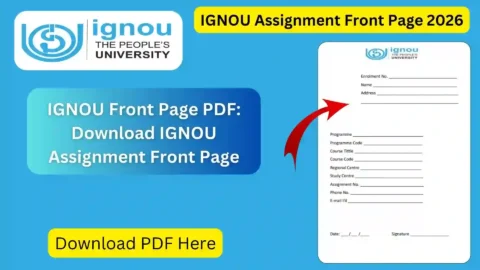
The first page of each assignment PDF should contain the required student and course information.
The reported OAMS instructions specify the following details:
| Particulars | Information to Include |
|---|---|
| Student Name | Your full name |
| Enrolment Number | Your IGNOU enrolment number |
| Study Centre Code | Code of your allotted study centre |
| Course Code | Code of the assignment being submitted |
| Regional Centre Code | Your regional centre code |
| Regional Centre Name | Name of your regional centre |
| Email Address | Your registered or applicable email address |
Check every detail before scanning the assignment. Incorrect enrolment numbers or course codes can create difficulties when the university processes the submission.
You can also use an assignment front page as a guide for organising your student details: https://ignoubank.com/ignou-assignment-front-page/
Make sure the information on the front page matches your official IGNOU records.
How to Check IGNOU Assignment Submission Status?
After uploading your assignment, it is important to confirm that the submission was successful.
The OAMS facility provides an online acknowledgement after successful submission. Students should save this acknowledgement and check their student accounts for available evaluation updates.
Follow these steps:
- Visit https://ignou.samarth.edu.in/index.php/site/login.
- Log in using your student account.
- Open the assignment-related section or OAMS facility.
- Check the available submission information.
- Verify that the correct course has been submitted.
- Save the acknowledgement for your records.
- Check again later for evaluation status updates.
The submission acknowledgement and assignment evaluation status are not the same. An acknowledgement confirms that the submission process was completed, while evaluation status provides information about the assessment.
Students should allow time for the university to process and evaluate submitted assignments.
What If the IGNOU Assignment Upload Fails?
Some students may experience technical difficulties while uploading their assignments. The problem may occur because of a slow internet connection, an oversized PDF, an incorrect file or temporary portal issues.
If your upload fails, try the following steps.
1. Check Your Internet Connection
Make sure your internet connection is stable. If the connection is interrupted during upload, the submission may not be completed.
2. Check the PDF File Size
Ensure that your PDF meets the file-size requirement. The reported maximum size is 20 MB per file.
3. Check the PDF Format
Upload the assignment in the prescribed PDF format. Do not upload an unsupported file type.
4. Verify the Course Code
Make sure the selected course matches the assignment PDF.
5. Try Again Later
If the portal is temporarily unavailable, wait and try again. Avoid repeated submissions without checking whether the previous upload was successful.
6. Check Your Email
After submission, check your registered email account for the acknowledgement. Also check the spam or junk folder.
7. Contact IGNOU
If the problem continues, contact your Regional Centre or the relevant university support department. Provide your enrolment number, programme, course code and a description of the issue.
Do not send assignment PDFs to random email addresses or unofficial contacts. IGNOU has specifically instructed students to use the designated online system where OAMS submission applies.
Do Students Need to Upload Assignments Again If Already Submitted?
This is an important question for students who have already submitted their assignments.
Students who have already passed an assignment for a particular course do not need to submit it again.
Similarly, students who have already submitted the relevant assignment in hard copy to their study centre or regional centre for the December 2026 TEE are not required to upload it again online under the announced instructions.
However, students should check their own submission records and the official notification before taking action. If you are unsure whether your earlier submission has been recorded, contact your study centre or Regional Centre.
Do not upload duplicate assignments simply because a new portal has been introduced.
Important Links for IGNOU Online Assignment Submission 2026
The following table contains useful links for students who want to submit assignments, download question papers or check their academic information.
| Purpose | Important Link |
|---|---|
| IGNOU Official Website | https://www.ignou.ac.in/ |
| IGNOU Online Assignment Login | https://ignou.samarth.edu.in/index.php/site/login |
| IGNOU Announcements | https://www.ignou.ac.in/announcements/0?nav=1 |
| IGNOU Assignment Question Papers | https://webservices.ignou.ac.in/assignments |
| IGNOU Assignment Front Page | https://ignoubank.com/ignou-assignment-front-page/ |
| IGNOU Grade Card Status | https://www.ignoubank.com/ignou-grade-card/ |
| IGNOU Study Material Status | https://www.ignoubank.com/ignou-book-status/ |
| IGNOU Examination Portal | https://exam.ignou.ac.in/ |
| IGNOU Grievance Portal | https://igram.ignou.ac.in/ |
| IGNOU Student Portal | https://ignou.samarth.edu.in/ |
Students should use the official IGNOU website and student portal for university-related submission instructions. The additional IGNOU Bank links are provided as helpful student resources.
Tips for Successful IGNOU Online Assignment Submission
To avoid last-minute problems, follow these practical suggestions:
- Complete your assignments well before the deadline.
- Read the correct assignment question paper for your programme and session.
- Write answers clearly and follow the prescribed instructions.
- Include all required details on the first page.
- Scan every page in the correct order.
- Create a separate PDF for each course.
- Check the PDF size before uploading.
- Verify the selected course code.
- Save the submission acknowledgement.
- Keep a backup copy of every submitted PDF.
- Check your student account for evaluation updates.
These steps can help you complete the assignment submission process more smoothly.
FAQ about IGNOU Online Assignment Submission 2026
What is IGNOU Online Assignment Submission 2026?
IGNOU Online Assignment Submission 2026 is the facility through which eligible ODL and online programme students can upload their assignments using the Online Assignment Management System (OAMS) through their Samarth student accounts.
What is the last date for IGNOU online assignment submission in 2026?
The announced last date for online assignment submission for the December 2026 TEE is 20 November 2026. Students should check the latest official notification for any further changes.
Where can I submit my IGNOU assignments online?
Students can log in to the IGNOU Samarth portal at https://ignou.samarth.edu.in/index.php/site/login and access the OAMS facility available in their accounts.
Is IGNOU assignment submission online or offline?
For the December 2026 TEE, IGNOU has introduced OAMS for eligible ODL and online programme learners. Students should follow the applicable online submission instructions. Those who have already submitted the relevant assignment in hard copy should check the university’s guidance before uploading it again.
Should IGNOU assignments be handwritten?
The reported OAMS instructions require handwritten assignments to be scanned and uploaded as PDFs. Students should follow the specific instructions applicable to their programme and course.
What is the maximum PDF file size for IGNOU online assignment submission?
The reported OAMS instructions specify a maximum file size of 20 MB per PDF. Check the portal for any updated technical requirements before uploading.
Should I upload a separate PDF for each course?
Yes. The reported instructions require course-wise assignment PDFs. Select the matching course code when uploading each file.
Can I submit assignments through email?
No. Students should use the designated OAMS facility where online submission is applicable. IGNOU has instructed learners not to send assignments by email to Regional Centres or other university offices.
Do I need to upload an assignment again if I have already passed it?
No. Students who have already passed the assignment for a particular course do not need to submit it again.
What if I have already submitted my assignment in hard copy?
Students who have already submitted the relevant assignment in hard copy to their study centre or Regional Centre for the December 2026 TEE should follow the university’s instructions and should not upload a duplicate unnecessarily.
How can I check my IGNOU assignment submission status?
Log in to your IGNOU Samarth account and check the assignment-related section. Save the acknowledgement generated after successful submission and check for evaluation updates later.
What should I do if my assignment upload fails?
Check your internet connection, PDF format, file size and selected course code. If the issue continues, try again later or contact your Regional Centre.
Will I receive an acknowledgement after submitting my assignment?
Yes. The OAMS facility provides an online submission acknowledgement after successful submission. A copy may also be sent to your registered email address.
Can I check my assignment marks online?
Students can check assignment evaluation information through the available IGNOU student services. The update may take time after submission because the assignment must be processed and evaluated.
Conclusion
The IGNOU Online Assignment Submission 2026 facility makes it easier for eligible students to submit their course-wise assignments without depending entirely on physical submission at study centres. Through the Online Assignment Management System, students can upload handwritten and scanned PDF assignments using their IGNOU Samarth accounts.
For the December 2026 Term-End Examination, the announced online assignment submission deadline is 20 November 2026. Students should prepare their PDFs carefully, include all required details on the first page, check the file size and select the correct course before submitting.
After completing the process, save the acknowledgement and check your account for evaluation updates. If you have already passed an assignment or submitted it in hard copy for the same examination session, follow IGNOU’s instructions before making another submission.
To avoid last-minute difficulties, complete your assignments early and regularly check the official IGNOU website for updated notices and instructions.